Addon Groups
Present related add-ons together when guests book
Addon Groups
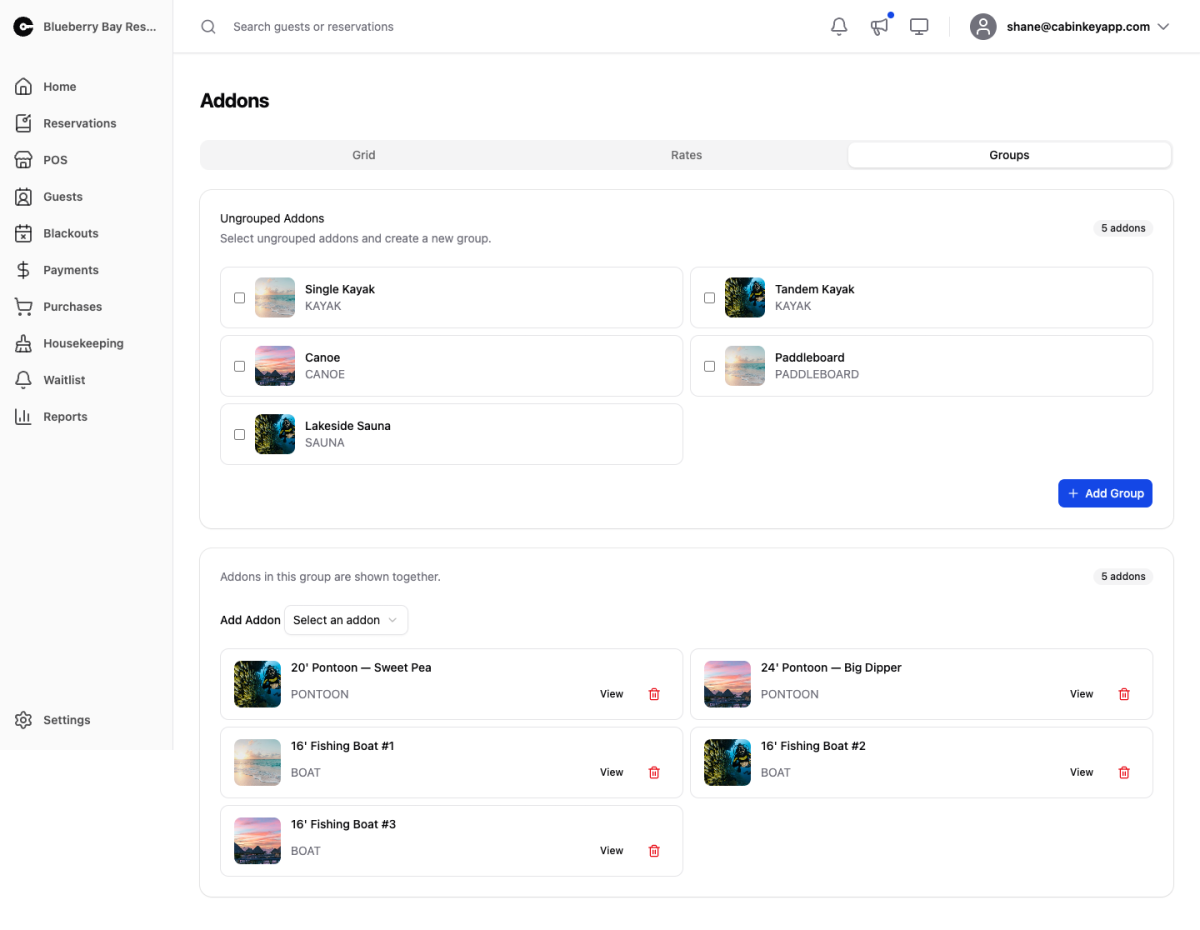 Click to enlarge
Group related add-ons — all your fishing boats, all your kayaks — so guests see them presented together rather than as one long undifferentiated list.
This matters most when you have several interchangeable items. A guest wanting a boat does not care whether they get boat #3 or boat #7; they care that a boat is available. Grouping lets them choose the category and lets you fill whichever unit is free.
The Ungrouped Addons card lists add-ons not yet in a group. Select two or more and Add Group to organize them. Within a group you can add or remove add-ons, and View jumps to any add-on’s detail page.
How grouping differs from sale items
An add-on belongs to at most one group. Sale item groups allow an item in several, because their job is organizing the point-of-sale screen rather than presenting a choice to guests.
The one-group rule keeps the guest-facing presentation unambiguous — an add-on cannot appear twice in the same booking flow under two headings.
Naming groups
Name them the way a guest would ask. “Fishing Boats” and “Kayaks & Canoes” work; “Group A” and “Watercraft Type 2” do not. The group name is what guests actually see and choose from, so it is doing real work.
Leaving a one-off add-on ungrouped is fine. Groups are for genuine categories, not an organizing exercise for its own sake.