Reservation Calendar
Every unit and add-on on a timeline
Reservation Calendar
 Click to enlarge
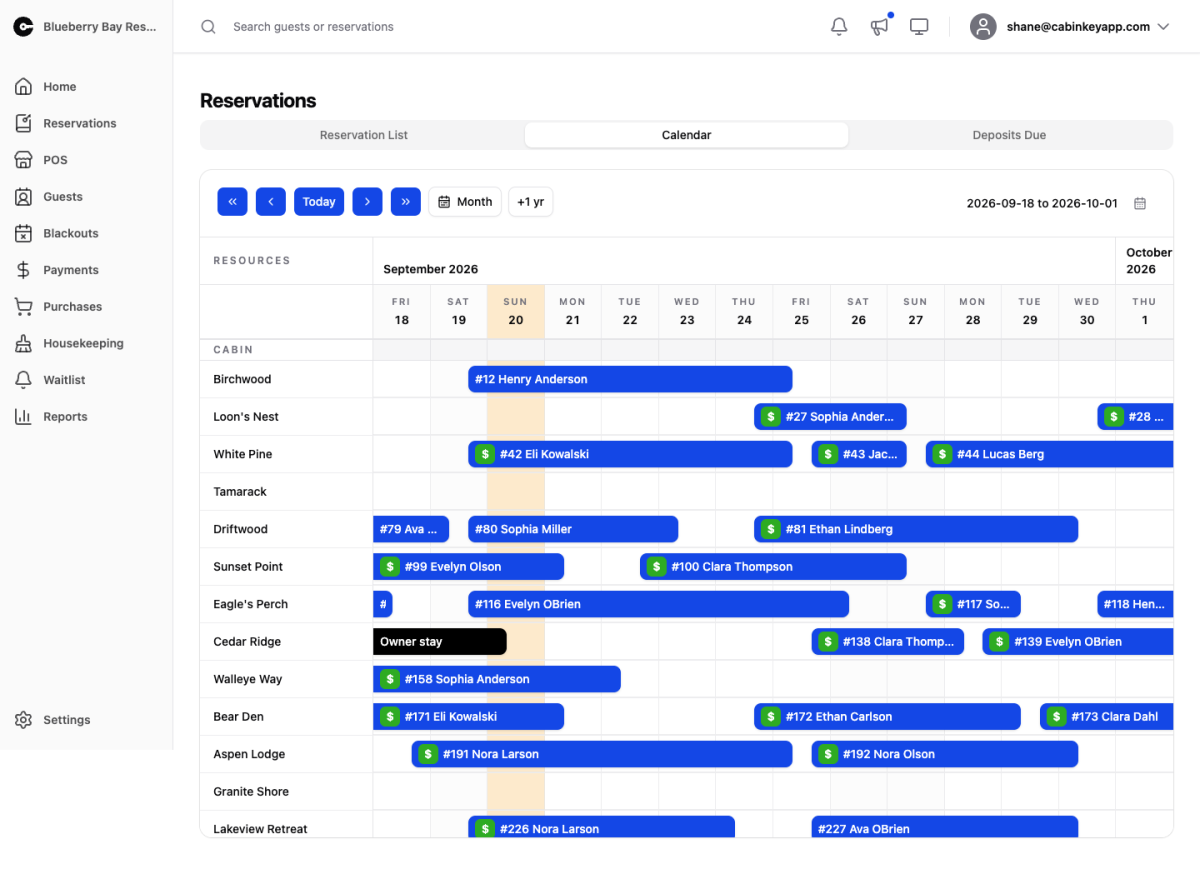
The resource calendar from Property Home, given the whole screen. Every unit and add-on is a row, reservations are bars across their dates, and blackouts show where a resource is unavailable for reasons other than a booking.
Move through time with the arrow controls, jump back to Today, switch between the two-week and month views, or skip a year ahead to look at the same week next season. Click any bar to open its detail page.
What to look for
The calendar answers questions a list cannot, because the gaps are as informative as the bookings:
- Orphan nights — a single night between two bookings that nothing can fill. If you see them repeatedly, your stay rules are probably allowing arrivals on days that strand nights.
- Uneven units — one cabin solidly booked while a comparable one sits empty usually means a pricing or presentation difference rather than a demand one. Check it against Unit Revenue and Utilization.
- Soft weeks — a vertical band of empty across every unit is a demand problem, and a better target for a length of stay tier or a discount than a permanent rate cut.
Use the month view for planning and the two-week view for operations. The year-ahead jump is most useful during checkout conversations, when a departing guest asks about next season.