Guest Site Preview
See your property as guests do, and get the links to publish it
Guest Site Preview
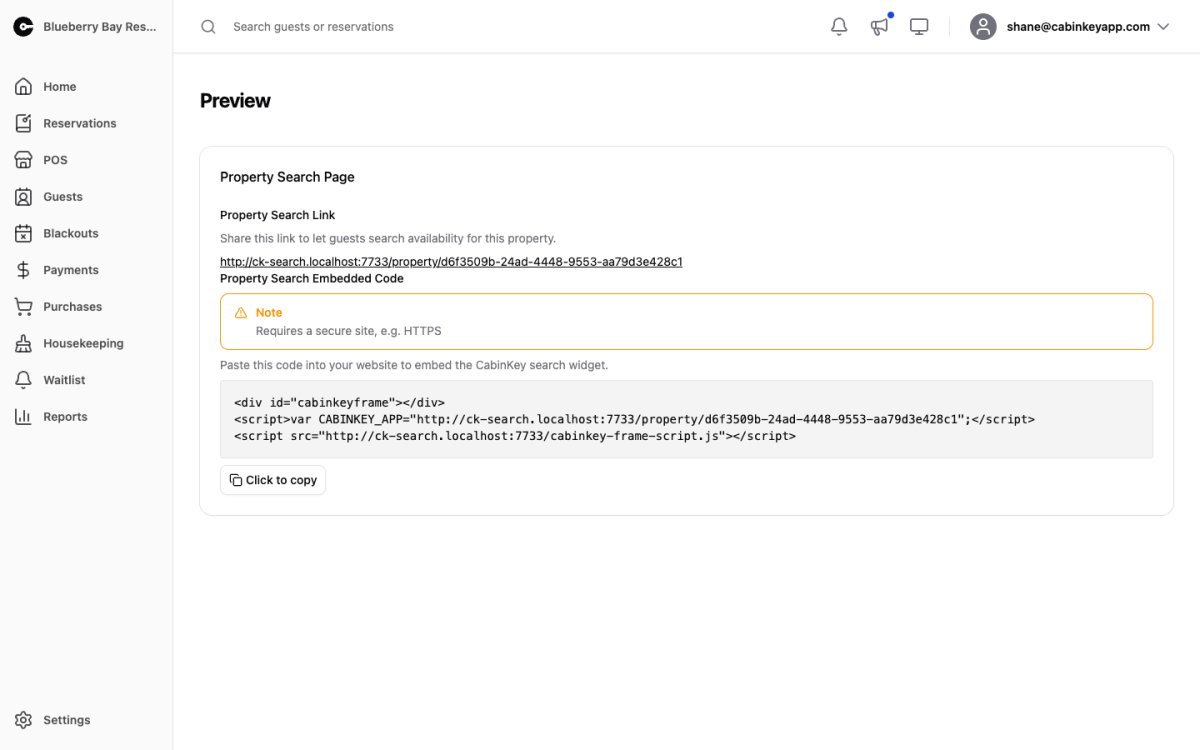 Click to enlarge
Your property as a guest sees it, plus the two things you need to publish it. Both fields are click-to-copy.
- Property Search Link — the direct link to your guest-facing availability search. This is what goes in emails, social posts, a Google Business listing, or anywhere else guests find you.
- Property Search Embedded Code — a snippet that embeds the CabinKey™ search widget in your own website, so guests book without leaving your site. Your site must be served over HTTPS for the embed to load.
Using it as a check
This page is worth visiting after any change to how you sell, because it shows the result of settings that are otherwise hard to picture from the admin side.
What appears here depends on your booking settings — the booking method decides whether guests see a full booking flow, an enquiry form, or just a message, and the guest-experience toggles control the availability calendar, pet search, and standalone add-on rentals. Your logo and images are what the page is dressed in.
If something looks wrong to a guest, it is nearly always one of those settings rather than the preview itself. The common ones: no availability showing usually means seasons or rates do not cover the dates being searched, and a missing booking button usually means the booking method is not set to CabinKey Booking.