Sale Item Groups
Organize the point-of-sale screen and online booking
Sale Item Groups
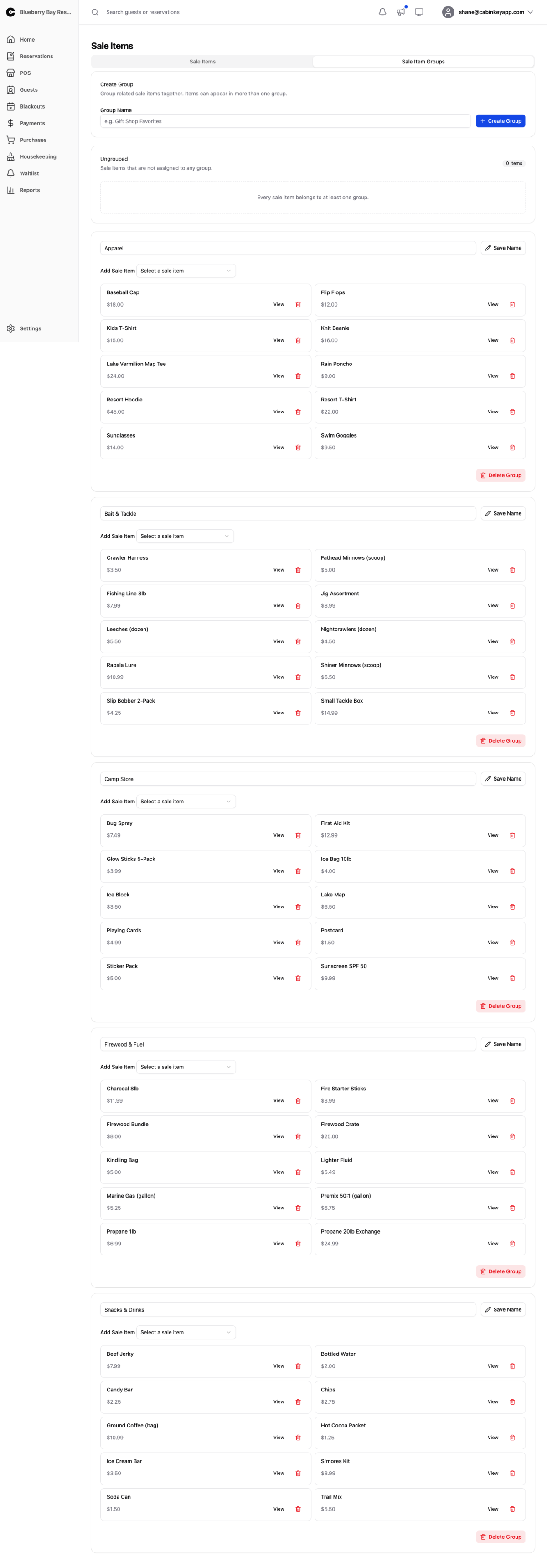 Click to enlarge
Groups organize how sale items are laid out — both on the Point of Sale item picker and during online booking.
This is mostly about counter speed. Every active item appears on the point-of-sale screen, and with a queue waiting, hunting for firewood among forty buttons costs real time. Sensible groups make it one tap to the right category.
Create Group starts a new group by name. Add or remove items, rename a group, or delete one. The Ungrouped card shows items not yet assigned anywhere.
Items can be in several groups
Unlike add-on groups, a sale item can belong to more than one group. Add-on groups present a choice to guests and must be unambiguous; sale item groups are a layout tool, and the same item can usefully appear in two places.
That makes a “Popular” or “Top Sellers” group worth having alongside your category groups. Put the ten things you sell most often in it, and the common transaction is one tap regardless of what category the item really belongs to.
Naming them
Name groups for how staff and guests look for things, not how you buy them. “Firewood & Ice” and “Fishing” beat “Consumables” and “Category 2”.
Keep the number of groups small enough to scan at a glance. Groups exist to reduce the amount of looking; too many of them just moves the problem up a level.