Email Templates
Which automated emails go out, and who receives them
Email Templates
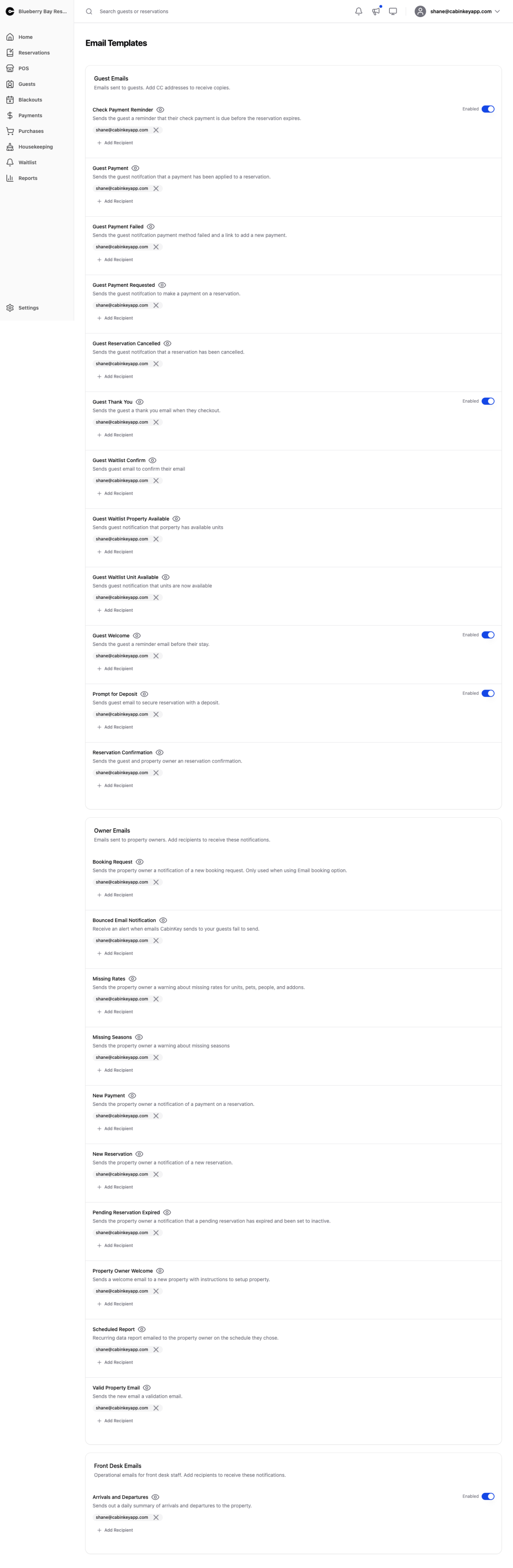 Click to enlarge
Which automated emails CabinKey™ sends for your property, and who gets them. Templates are grouped by audience:
- Guest Emails — confirmations, receipts, and other guest-facing mail. CC addresses receive copies of exactly what guests get.
- Owner Emails — notifications for property owners: new bookings, payments, cancellations.
- Front Desk Emails — operational mail for staff working the desk.
Toggle each template Enabled or Disabled, and use Add Recipient to pick addresses from the property’s contact emails. An address has to exist there before it can be chosen here, which is the usual reason a recipient you expect is missing from the list.
Choosing what to enable
Guest emails are the ones that matter most, and confirmations especially — a guest who does not receive one will call to ask whether their booking worked, and every one of those calls is avoidable.
Owner and front desk notifications are easier to over-subscribe. A property taking several bookings a day generates enough mail that people stop reading it, which defeats the purpose. Enable the ones that genuinely need a response and let the rest be something you check in Dash.
CC on guest emails is worth having on at least one address. It means you can see what a guest actually received rather than what you think the system sent, which settles most disputes in seconds.
When mail does not arrive
A guest reporting a missing confirmation is usually one of three things: the template is disabled, their address was mistyped at booking, or it went to spam. The Send Confirmation action on the reservation resends it, and a CC copy tells you whether it left at all.
Only active addresses that can receive mail are offered as recipients, so an address that starts bouncing will drop out of the options on its own.