Rate Plans
Named nightly and weekly pricing, assigned to units per season
Rate Plans
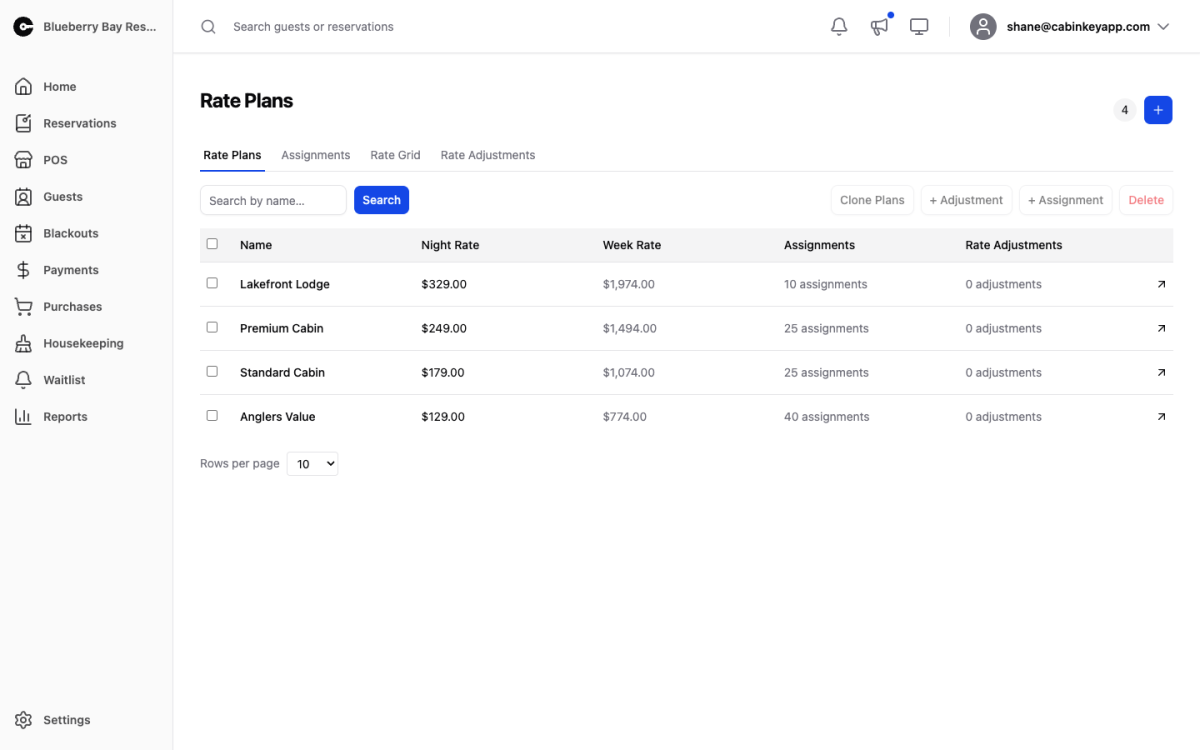 Click to enlarge
Rate plans are the Rate v2 pricing engine. A plan holds a nightly and optional weekly rate, carries rate adjustments on top, and is assigned to season-and-unit combinations. Each unit uses exactly one plan per season.
The point of named plans is reuse. If eight cabins are priced identically, one “Standard Cabin” plan assigned to all eight means a price change is one edit rather than eight — and no risk of one being missed.
This is one of two pricing engines. If your property is on Rates v3, rates live on a daily calendar instead and these pages do not drive your quotes. Check which you are on under General Settings.
The list shows each plan’s name, night rate, week rate, and how many assignments and adjustments it carries. The assignment count is the one to watch: a plan with zero assignments is not pricing anything.
From here you can:
- Search for a plan by name.
- Select plans to Clone or Delete in bulk. Cloning is how you build next season from this one.
- Add Rate Adjustment — attach one adjustment to every selected plan at once, which is how a property-wide pet fee gets applied without opening each plan.
- Add Assignment — assign a plan to a season and unit.
Click a plan to open its detail page.
Plans or the grid?
If you would rather not manage named plans at all, the Simple Rate Grid gives you a spreadsheet of units and rates and creates the plans behind the scenes. Both views work on the same data, so you can start with the grid and move here when you need shared plans or several adjustments per plan.