Booking Settings
How guests book with you, and what they can see and do on your property page
Booking Settings
 Click to enlarge
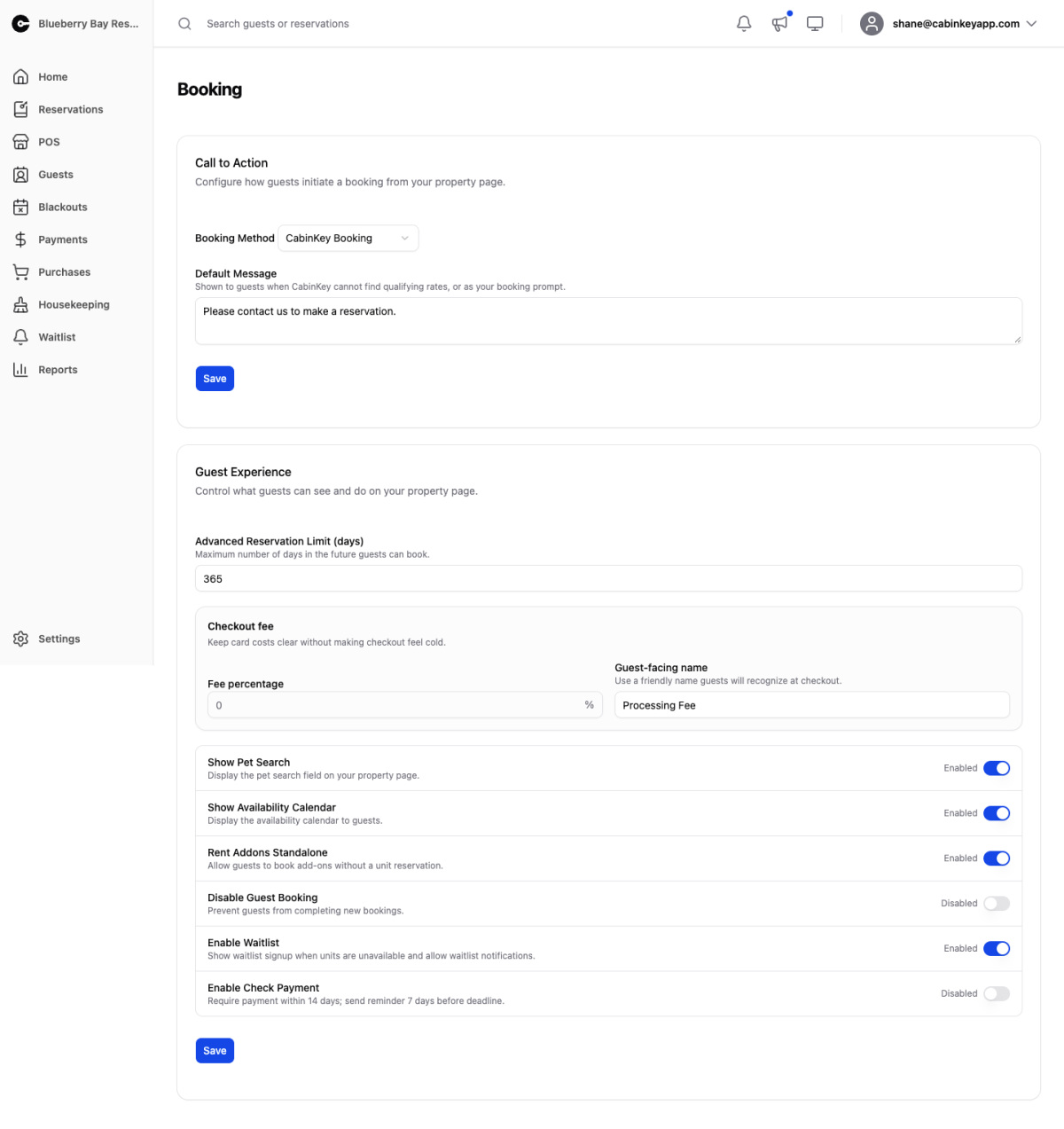
Two things live here: how a guest actually starts a booking, and what your guest-facing property page lets them do.
Call to Action
The Booking Method decides what happens when a guest clicks to book:
- CabinKey Booking — the guest books through CabinKey™ end to end. This is the one that uses everything else you have configured: rates, availability, deposits, and taxes.
- Email Form — the guest sends you an enquiry instead of booking, and you take it from there. Sensible while you are still setting up rates.
- Show Message — display your Default Message rather than a booking control. Use it when you are not taking bookings online at all.
- Redirect to Unit URL — send the guest to a URL you set on each unit.
- Jackrabbit, Lodgix, InnRoad, LodgeVault, RezStream, Availability Online — hand booking off to an external system. Each needs its own identifier, and the matching field appears when you pick it.
The Default Message is also shown when CabinKey™ cannot find qualifying rates for what the guest asked for — a useful place to tell them to call rather than leaving them at a dead end. If guests report they cannot book dates you believe are open, check your seasons and rates before anything else.
Guest Experience
Advanced Reservation Limit caps how far ahead guests can book, in days. Keep it inside the range your seasons and rates actually cover, or guests will reach dates you have not priced.
Checkout fee adds a percentage at checkout with a name guests will recognize. Set the Fee percentage and a Guest-facing name — something like “Card processing” reads better than “Fee”. Check the rules for your jurisdiction and card network before passing processing costs on.
The toggles control the guest-facing page:
- Show Pet Search — lets guests filter for pet-friendly units. Only worth showing if some of your units take pets.
- Show Availability Calendar — shows guests what is open before they commit to dates.
- Rent Addons Standalone — lets guests book an add-on without a unit stay, for a day-use boat or kayak rental.
- Disable Guest Booking — stops new bookings without taking your page down. This is the switch for the end of a season or an emergency closure.
- Enable Waitlist — offers waitlist signup when units are unavailable, feeding the waitlist and allowing notifications when dates free up. Worth having on whenever you are regularly sold out.
- Enable Check Payment — lets guests pay by check, with a payment deadline and a reminder before it. The current deadline and reminder windows are shown on the toggle itself.